Take a prompt template and turn it into a reusable, auto-activating skill with steering and hooks.
⏱ 40 minutes
Exercise Overview
In the earlier exercise, you built a prompt template (merchant risk assessment or credit risk narrative). Now you'll convert that template into a production-ready SKILL.md file that:
Auto-activates when someone mentions the relevant task
Is shared across your team via version control
Has guardrails built in at every layer
Works in both Kiro and Claude Cowork
💡 What you'll learn
This exercise teaches the three-layer Kiro automation stack: Steering (global rules) + Skills (on-demand expertise) + Hooks (automated triggers). By the end, you'll have a working skill that could be deployed in your team's project today.
📁 Where your files will go
.kiro/steering/
Global rules (Step 1)
.kiro/skills/
Skill files (Steps 2, 5a)
.kiro/hooks/
Hook files (Step 3)
.kiro/agents/
Custom agents (Bonus)
lab8-convert-skill/
All test data & outputs — CSV inputs, assessment reports, parallel views, synthesis
Step
What you do
Duration
Step 1
Create a steering file with global rules
5 min
Step 2
Convert your prompt template to SKILL.md
8 min
Step 3
Add a hook to auto-trigger the skill
7 min
Step 3b
Update your skill — iterate on the output
5 min
Step 4
Test the full stack
5 min
Step 5
Multi-agent: Parallelization with 2 skills
10 min
⭐ Bonus
Sub-agents: Delegate tasks to specialized AI agents (optional)
10 min
Step 1: Create a Steering File
Steering files are always-on rules that apply to every conversation in your project. They're like a team style guide for AI.
💡 Why concise matters: Always-on steering files are sent with every single message you send to Kiro — they consume tokens on every request. A 200-word steering file is fine; a 2,000-word one wastes tokens on every interaction. Keep always files to essential rules only. For heavy reference docs, use manual inclusion mode instead. See: Token Cost in AI Tools →
In Kiro, ask the AI to create a steering file:
PROMPT — Copy & paste into Kiro
Create a steering file at .kiro/steering/anycompany-rules.md with these global rules for our AnyCompany Financial Group project:
1. All monetary amounts must be in SGD (Singapore Dollars) unless a specific market is referenced
2. Never include personally identifiable information (PII) in outputs — use [REDACTED] for names, account numbers, and contact details
3. Use AnyCompany Financial Group as the company name throughout
4. Southeast Asian market context: Singapore, Malaysia, Indonesia, Thailand, Vietnam, Philippines
5. All risk ratings must use the GREEN/AMBER/RED scale
6. When citing data, always reference the specific source field or document section
7. If data is missing or unavailable, state "DATA NOT AVAILABLE" rather than estimating
Format it as a proper Kiro steering file with a front-matter section.
✅ Checkpoint: You should now have a file at .kiro/steering/anycompany-rules.md. Open it and verify the rules are there. These rules will apply to every conversation in this project from now on.
Step 2: Convert Your Template to SKILL.md
Now take the prompt template you built in the earlier exercise and convert it into a SKILL.md file.
📝 Why Markdown? Notice this is a .md file — not Word, not PDF. Markdown is the format AI tools read natively: ## headings give structure, | tables stay intact, and it uses 60% fewer tokens than HTML for the same content. Your steering files, skills, and RAG documents are all Markdown for the same reason — it's the interface layer between you and AI.
📂 Lab 1 Working Folder
All Lab 1 outputs will go into a dedicated lab8-convert-skill/ folder. The .kiro/ config files (steering, skills, hooks, agents) live in their standard locations.
⚠️ Which template to reference? Use whichever you built in the earlier exercise:
Option A: Your merchant risk assessment template
Option B: Your credit risk narrative template
Don't have a template saved? That's fine — the prompts below include all the details Kiro needs to create the skill from scratch.
Ask Kiro to create the skill:
PROMPT — For Merchant Risk template
Create a folder called "lab8-convert-skill" in the workspace root — this is where all our Lab 1 test data and outputs will go.
Then create a Kiro skill at .kiro/skills/merchant-risk-assessment/SKILL.md
Use this structure:
- name: merchant-risk-assessment
- description: Generate standardized merchant risk assessments with GREEN/AMBER/RED ratings. Use when reviewing merchant data, preparing risk committee reports, or evaluating merchant applications for AnyCompany Financial Group.
For the skill content, use the prompt template from the earlier exercise (or let Kiro create it from scratch using the details below). The template should include:
- The Senior Risk Analyst persona
- The 8-section structured output (Risk Rating, Executive Summary, Transaction Analysis, Chargeback Assessment, Complaint Analysis, Compliance Status, Recommended Actions, Monitoring Plan)
- Use colored circle indicators for ratings: 🟢 GREEN, 🟡 AMBER, 🔴 RED
- For portfolio/multi-merchant assessments, include a summary table with colored ratings
- RAG grounding rules (ONLY use provided data)
- Self-critique step
- All {{variables}} for merchant data inputs
Also add a "## When to Use" section listing the trigger scenarios:
- New merchant onboarding review
- Quarterly merchant portfolio assessment
- Triggered by chargeback rate exceeding 1.0% threshold
- Risk committee preparation
And a "## Guardrails" section with:
- Use ONLY provided merchant data
- Do not reference external data sources
- Flag [DATA NOT AVAILABLE] for missing metrics
- Escalate to human review if risk rating is RED
PROMPT — For Credit Risk template (alternative)
Create a Kiro skill at .kiro/skills/credit-risk-narrative/SKILL.md
Use this structure:
- name: credit-risk-narrative
- description: Convert quantitative credit model outputs (PD, LGD, DSCR) into plain-language narratives for credit committees. Use when preparing credit applications, PayLater limit reviews, or merchant financing assessments.
For the skill content, use the prompt template I built in the earlier exercise. Include:
- The Credit Committee Analyst persona
- Structured output with APPROVE / APPROVE WITH CONDITIONS / DECLINE
- Bull case and bear case analysis
- All {{variables}} for credit model inputs
Add "## When to Use" and "## Guardrails" sections similar to the merchant risk skill.
✅ Checkpoint: You should now have a SKILL.md file in .kiro/skills/merchant-risk-assessment/ (or credit-risk-narrative/). Open it and verify:
The frontmatter has name and description fields
The description includes trigger keywords
The template content matches what you built earlier
There's a Guardrails section with negative constraints
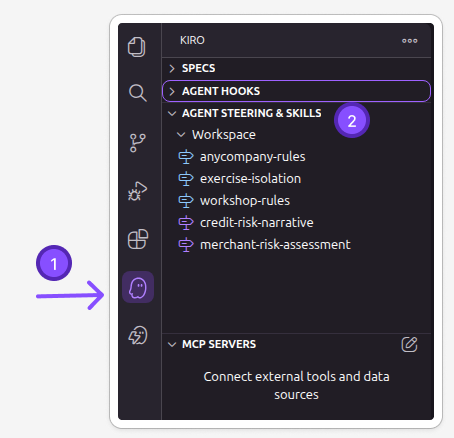
🔍 Verify: Click the Kiro icon to confirm your skill was created
After Kiro creates the SKILL.md file, verify it appears in the Skills panel. Click the Kiro icon in the left sidebar → look under Agent Skills — your new skill should be listed:
If you don't see the skill listed, check that the file was created at the correct path: .kiro/skills/merchant-risk-assessment/SKILL.md
Step 3: Add a Hook for Auto-Triggering
Hooks make your skill run automatically when certain events happen — no prompting needed.
PROMPT — For Merchant Risk hook
Create a Kiro hook that automatically runs the merchant risk assessment when new merchant data files are added to the lab8-convert-skill folder.
The hook should:
- Trigger when a CSV file is created in the workspace (pattern: lab8-convert-skill/*.csv)
- Ask the agent to: "A new merchant data file was created in lab8-convert-skill/. Use the merchant-risk-assessment skill to analyze this data and generate a risk assessment report. Save the output as a markdown file in the lab8-convert-skill/ folder with '_assessment.md' appended to the original filename (e.g., merchant_data_assessment.md)."
Save it as a proper Kiro hook file.
PROMPT — For Credit Risk hook (alternative)
Create a Kiro hook that automatically runs the credit risk narrative when new credit application files are added to the lab8-convert-skill folder.
The hook should:
- Trigger when a CSV file is created in the workspace (pattern: lab8-convert-skill/*.csv)
- Ask the agent to: "A new credit application file was created in lab8-convert-skill/. Use the credit-risk-narrative skill to analyze this data and generate a credit committee narrative with APPROVE / APPROVE WITH CONDITIONS / DECLINE recommendation. Save the output as a markdown file in the lab8-convert-skill/ folder with '_narrative.md' appended to the original filename (e.g., credit_app_narrative.md)."
Save it as a proper Kiro hook file.
✅ Checkpoint: You should now have a hook file. To test it, create a CSV file in the lab8-convert-skill/ folder — use the sample below:
lab8-convert-skill/merchant_data.csv — Copy & save as a new file
After saving the CSV file to lab8-convert-skill/merchant_data.csv:
The hook should trigger automatically and Kiro should generate a risk assessment
Check that the steering rules are applied (SGD currency, no PII, GREEN/AMBER/RED ratings)
Verify the output file was created at lab8-convert-skill/merchant_data_assessment.md (or _narrative.md)
💡 Tip: The CSV above has three merchants with different risk profiles — Kopi Corner (AMBER: high chargeback rate), QuickMart (RED: rapid growth + high chargebacks + complaints), and Warung Nusantara (GREEN: stable, low risk). Your skill should rate them differently.
Step 3b: Update Your Skill — Iterate on the Output
You've seen the first output from your skill. Now improve it — this is how real skill development works. Skills are living documents that you refine based on results.
💡 Why this matters: In practice, you'll create a skill, test it, see what's missing, and update it. This iterative loop — create → test → improve → test again — is how you build production-quality skills. The SKILL.md file is never "done".
Look at the assessment output from Step 3. Pick one or more improvements below and ask Kiro to update your skill:
PROMPT — Add visual rating indicators
Update my merchant-risk-assessment skill at .kiro/skills/merchant-risk-assessment/SKILL.md
Add these improvements to the template:
1. Use colored circle emoji indicators for ratings: 🟢 GREEN, 🟡 AMBER, 🔴 RED
2. For multi-merchant assessments, start with a Portfolio Summary table showing all merchants with their ratings
3. Add a "Decision Rules" section that enforces these thresholds:
- Chargeback rate > 2.0% → automatically RED
- Chargeback rate 1.0-2.0% → AMBER minimum
- Complaints > 5 in 30 days → escalate one level
4. Add an "Escalation" section at the end: if any merchant is RED, include a recommended escalation path
Keep everything else in the skill unchanged.
PROMPT — Alternative: Add regional context
Update my merchant-risk-assessment skill at .kiro/skills/merchant-risk-assessment/SKILL.md
Add a "Regional Context" section to the template that:
1. Detects the merchant's market from the data (Singapore, Malaysia, Indonesia, Thailand, Vietnam, Philippines)
2. Applies the relevant regulator's thresholds:
- Singapore (MAS): chargeback ceiling 1.0%
- Malaysia (BNM): chargeback ceiling 1.5%
- Indonesia (OJK): chargeback ceiling 2.0%
3. References the correct currency (SGD, MYR, IDR, THB, VND, PHP)
4. Notes any market-specific compliance requirements
Keep everything else in the skill unchanged.
✅ Checkpoint: After updating, re-run the assessment on the same CSV data:
Delete the previous lab8-convert-skill/merchant_data_assessment.md output file
Re-save or re-create the CSV file in lab8-convert-skill/ to trigger the hook again
Compare the new output with the previous one — you should see the improvements (colored indicators, decision rules, or regional context)
💡
The skill iteration loop: Create → Test → See gaps → Update SKILL.md → Test again. This is exactly how your tech team will develop skills for production use. Each iteration makes the output more consistent, more complete, and more aligned with your business rules.
Step 4: Test the Full Stack
Now test that all three layers work together:
PROMPT — Test the skill activation
I need to review a merchant for the risk committee. Here's the data:
Merchant: QuickMart Express Pte Ltd (ID: MC-9921)
Sector: Convenience retail, Singapore
Monthly transactions: 2,100 → 8,400 (6-month trend)
Average transaction: $12.30 SGD
Chargeback rate: 0.4% → 3.2% (6-month trend)
Complaints: 8 in last 30 days (up from 1)
PayLater adoption: 45% of transactions
Account age: 14 months
Generate a full risk assessment and save it to lab8-convert-skill/quickmart_risk_assessment.md
✅ Verify the output:
Did the skill auto-activate (you didn't need to paste the template)?
Are amounts in SGD (steering rule)?
Is there a GREEN/AMBER/RED rating (steering rule)?
Does every claim cite specific data (skill guardrail)?
Are there specific recommended actions with owners (skill template)?
🎉 What You've Built (Steps 1-4)
A steering file with global rules that apply to every conversation
A SKILL.md that auto-activates when someone mentions merchant risk
A hook that triggers the skill automatically when new data arrives
A layered guardrails system — global rules + task-specific constraints
A portable skill that works in both Kiro and Claude Cowork
Step 5: Multi-Agent Parallelization
📖 Pattern: Parallelization (Workflow Patterns)
In real organizations, merchant reviews involve multiple perspectives — risk, compliance, and business development all look at the same data but focus on different signals. Parallelization runs multiple "agents" (skills) simultaneously and combines their outputs. Each perspective is a separate, reusable skill.
5a. Create a second skill — Compliance Officer perspective
You already have a Risk Analyst skill from Step 2. Now create a Compliance Officer skill that looks at the same merchant data through a regulatory lens:
PROMPT — Create the Compliance skill
Create a second Kiro skill at .kiro/skills/merchant-compliance-review/SKILL.md
- name: merchant-compliance-review
- description: Review merchant data from a regulatory compliance perspective. Use when assessing KYC status, regulatory obligations, and compliance risks for AnyCompany Financial Group merchants across Southeast Asian markets.
The skill should use this persona:
"You are a Senior Compliance Officer at AnyCompany Financial Group with 10 years of experience in Southeast Asian financial regulations. You specialize in MAS (Singapore), BNM (Malaysia), and OJK (Indonesia) requirements for e-payment service providers. You are meticulous, regulation-focused, and always cite the specific regulatory requirement behind each finding."
The output should have EXACTLY these sections:
1. REGULATORY PROFILE — Which jurisdiction, applicable regulations, license requirements
2. KYC & AML STATUS — Verification status, beneficial ownership, PEP screening, last review date
3. COMPLIANCE CONCERNS — Each concern with: specific regulation referenced, severity (CRITICAL/HIGH/MEDIUM/LOW), evidence from data
4. TRANSACTION MONITORING FLAGS — Patterns that may trigger regulatory reporting obligations (e.g., unusual volume spikes, cross-border patterns)
5. REGULATORY RISK RATING — COMPLIANT / WATCH LIST / NON-COMPLIANT with justification
6. REQUIRED ACTIONS — Numbered list with regulatory deadline references where applicable
Include the same grounding rules as the risk assessment skill:
- ONLY use provided data
- Cite specific data points for every finding
- State "INSUFFICIENT DATA" if information is missing for a compliance check
- Do NOT assume compliance status — verify against provided data
✅ Checkpoint: You should now have at least two skills in .kiro/skills/:
Note: If you chose the credit risk path earlier, you may already have credit-risk-narrative/SKILL.md instead of (or in addition to) the merchant risk skill. That's fine — you now have two different perspectives on the same data, which is exactly what we need for the next step.
5b. Run both perspectives on the same merchant
Now feed the same merchant data to both skills and compare the outputs:
PROMPT — Run the Risk Analyst perspective
Using the merchant-risk-assessment skill, analyze this merchant and save the output as "lab8-convert-skill/parallel-risk-view.md":
Merchant: QuickMart Express Pte Ltd (ID: MC-9921)
Sector: Convenience retail, Singapore
Monthly transactions: 2,100 → 8,400 (6-month trend)
Average transaction: $12.30 SGD
Chargeback rate: 0.4% → 3.2% (6-month trend)
Complaints: 8 in last 30 days (up from 1)
Top complaint: "Unauthorized transaction" (62%)
PayLater adoption: 45% of transactions
Account age: 14 months
KYC: Verified (last updated: 8 months ago)
Beneficial owner: Chen Wei (Singapore PR)
Related merchants: 1 flagged entity — QuickMart Online (MC-9922, suspended 2 months ago)
Note: Merchant flagged by automated monitoring system 3 days ago
Start a New Session, then run the compliance perspective on the same data:
PROMPT — Run the Compliance Officer perspective
Using the merchant-compliance-review skill, analyze this merchant and save the output as "lab8-convert-skill/parallel-compliance-view.md":
Merchant: QuickMart Express Pte Ltd (ID: MC-9921)
Sector: Convenience retail, Singapore
Monthly transactions: 2,100 → 8,400 (6-month trend)
Average transaction: $12.30 SGD
Chargeback rate: 0.4% → 3.2% (6-month trend)
Complaints: 8 in last 30 days (up from 1)
Top complaint: "Unauthorized transaction" (62%)
PayLater adoption: 45% of transactions
Account age: 14 months
KYC: Verified (last updated: 8 months ago)
Beneficial owner: Chen Wei (Singapore PR)
Related merchants: 1 flagged entity — QuickMart Online (MC-9922, suspended 2 months ago)
Note: Merchant flagged by automated monitoring system 3 days ago
5c. Compare the two perspectives
Open lab8-convert-skill/parallel-risk-view.md and lab8-convert-skill/parallel-compliance-view.md side by side. Start a New Session and ask Kiro to synthesize:
PROMPT — Synthesize both perspectives
Read the files "lab8-convert-skill/parallel-risk-view.md" and "lab8-convert-skill/parallel-compliance-view.md". These are two independent assessments of the same merchant — one from a Risk Analyst perspective, one from a Compliance Officer perspective.
Create a synthesized "Merchant Review Committee Brief" that:
1. Summarizes the key findings from BOTH perspectives in a single executive summary (3-4 sentences)
2. Shows where the two perspectives AGREE (shared concerns)
3. Shows where they DIFFER (risk-specific vs compliance-specific findings)
4. Provides a COMBINED recommendation that weighs both views
5. Lists the top 5 priority actions, noting which perspective (Risk or Compliance) drives each one
Save the output as "lab8-convert-skill/parallel-synthesis.md".
🔍 What to observe:
The Risk Analyst likely focuses on chargeback trends, volume spikes, and financial exposure
The Compliance Officer likely focuses on KYC staleness (8 months old), the related suspended entity, and "unauthorized transaction" patterns triggering MAS reporting
The synthesis should surface insights that neither perspective alone would catch — e.g., the combination of a suspended related entity + unauthorized transaction complaints may indicate a coordinated fraud pattern that requires both risk action AND regulatory reporting
💡 This is Parallelization in action
You just ran the same data through two independent "agents" (skills) and combined their outputs. In production, this pattern scales to any number of perspectives:
Settlement reliability, support ticket load, integration health
Each skill is a separate file, maintained by the team that owns that perspective. The synthesis step combines them — just like a real review committee meeting, but in seconds instead of hours.
🎉 What You've Built (Complete)
A steering file with global rules
Two SKILL.md files — Risk Analyst + Compliance Officer perspectives
A hook for auto-triggering
A parallelization workflow — same data, multiple perspectives, synthesized output
A layered guardrails system at every level
A direct demonstration of the Parallelization pattern in action
⭐ Bonus Step: Sub-Agents (Optional)
🧠 What are sub-agents?
Sub-agents are AI agents that get delegated tasks by another AI agent. Instead of one agent doing everything sequentially, the main agent can spawn specialized sub-agents that run independently — each with their own tools and context.
In this bonus step, you'll create a custom agent, then invoke it to review the risk assessment you generated earlier.
Part A: Create the Finance Reviewer Agent
Ask Kiro to create a custom agent that can review risk assessments:
PROMPT — Create custom agent
Create a custom agent called "finance-reviewer" that specializes in:
- Reviewing merchant risk assessments for completeness
- Checking that all 8 required sections are present (Risk Rating, Executive Summary, Transaction Analysis, Chargeback Assessment, Complaint Analysis, Compliance Status, Recommended Actions, Monitoring Plan)
- Verifying that guardrails were followed (no PII, SGD currency, GREEN/AMBER/RED ratings)
- Scoring the assessment quality on a 1-10 scale with specific improvement suggestions
Save it as a custom agent file at .kiro/agents/finance-reviewer.md with read-only tool access.
✅ Checkpoint: You should now have a file at .kiro/agents/finance-reviewer.md. Open it — you'll see frontmatter with name, description, and tools: ["read"], followed by the review framework. This agent is now permanently available in your workspace.
Part B: Invoke the Agent to Review Your Work
Now use the agent you just created to review the risk assessment you generated in Step 4:
PROMPT — Invoke the custom agent
Use the finance-reviewer agent to review the merchant risk assessment I generated earlier.
The file is at lab8-convert-skill/quickmart_risk_assessment.md
Have the agent check completeness, guardrail compliance, and give a quality score.
✅ What you'll see: Kiro delegates the review to the finance-reviewer agent. The agent runs independently — it reads the assessment file with its own tools, applies the review framework, and returns a structured report with completeness score, guardrail pass/fail checks, a quality score out of 10, and specific improvement suggestions. Kiro then presents the results to you.
Part C: Try a Built-in Sub-Agent (Optional)
Kiro also has built-in sub-agents that it uses automatically. Try asking it to delegate a task:
PROMPT — Built-in sub-agent delegation
I need you to do two things at the same time:
1. Use a sub-agent to explore this workspace and give me a summary of all the files we created today — steering, skills, hooks, and agents. List each file with a one-line description.
2. While that's running, help me draft a 3-sentence executive summary of what we built: the Kiro automation stack (steering + skills + hooks + MCP) and how it connects to prompt templates.
💡 How to call your custom agent in the future
Your finance-reviewer agent is now a file in your workspace — just like skills and steering. To use it again anytime, just ask Kiro:
"Use the finance-reviewer agent to review this file"
"Have the finance-reviewer check my latest risk assessment"
"Run the finance-reviewer on all assessment files in this folder"
The agent persists in .kiro/agents/ — version it in git, share with your team, iterate on the review criteria. Same workflow as skills.
🔑 Sub-agents summary
Type
Where it lives
How to use
Built-in: Context Gatherer
Built into Kiro
Kiro uses it automatically when exploring unfamiliar code, or you ask "explore this workspace"
Built-in: Task Executor
Built into Kiro
Kiro delegates subtasks automatically, or you ask "do X and Y in parallel"
Custom Agent
.kiro/agents/[name].md
You create it once, then invoke by name: "use the [name] agent to..."
SKILL.md Best Practices
Practice
Why
Keep SKILL.md under 500 lines
Longer files slow down activation and reduce quality
Name: lowercase, hyphens, max 64 chars
Follows the Agent Skills standard for portability
Description: include trigger keywords
This is how the AI decides when to activate your skill
One skill, one job
Don't combine risk assessment + fraud detection in one skill
Include guardrails IN the skill
Defense in depth — don't rely only on steering
Add examples of good output
Helps the AI understand what "done well" looks like
Version via git
Track changes, roll back if quality drops after edits